This article is written in Korean. Use the button below or your browser’s translate feature to read it in your language.
Open in Google TranslateMT5 추세선, 수평선, 싸이클라인, 엘리엇트 파동, 채널 그리기

골드스터디
☆☆☆☆☆
삽입 -> 추세선으로 들어가셔서, 여러가지 추세선을 이용하실 수 있습니다.
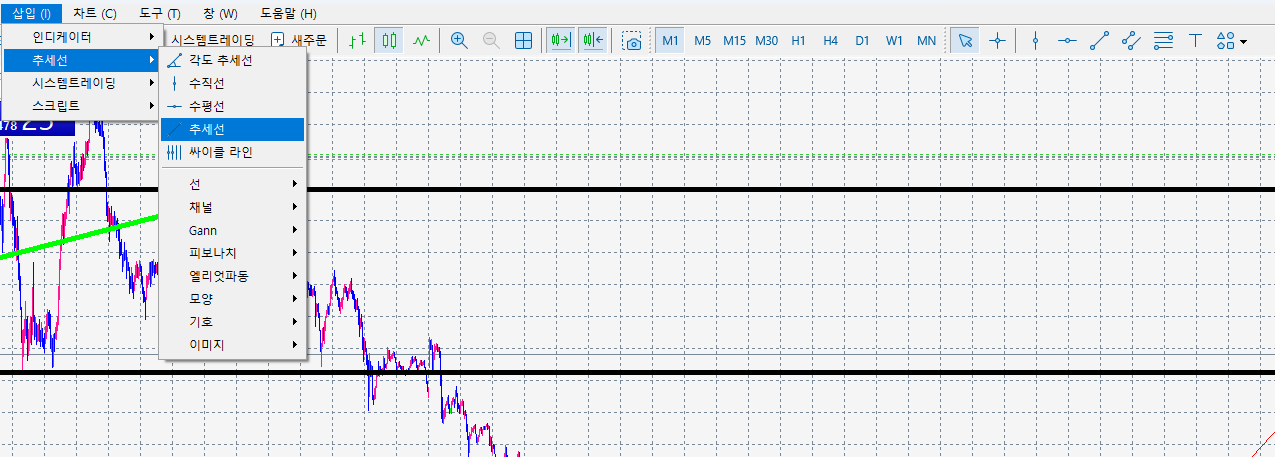
다음 추세선 클릭
> 우클릭
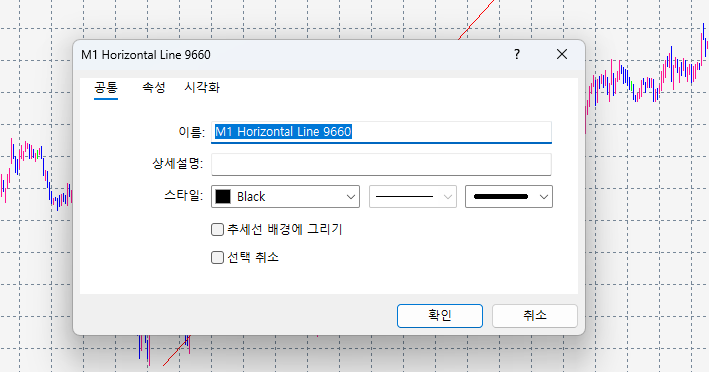
> 속성
에 들어가시면
색상과 굵기를 조절 하실 수 있습니다.
Share
Link copied
Written by
골드스터디 · developer & trader, 17 years
I start every morning with the main news and ask “why?” before “how much?”. I only list brokers where I opened an account and traded myself first. If a condition changed or something is wrong, tell me and I’ll fix it.
Brokers mentioned in this article
★ GoldStudy partner link Sign up through this link to get GoldStudy support


