Let’s start by pointing out the difference between MT4 and MT5 and that the accounts are not compatible with each other.

Rate this note
GoldStudyNet · Platform Comparison
Let’s start by pointing out the difference between MT4 and MT5 and that the accounts are not compatible with each other.
This came to mind when I heard that even players with the same name play differently in each era. We compared the actual differences between MT4 and MT5, which have similar names.
Hello everyone. Among soccer fans, the name Ronaldo still comes up often. When I hear that name, my ears perk up too.

Whenever the topic of soccer comes up, this kind of conversation always follows. ‘The players of the past were greater’, ‘No, the players these days are greater’. I too have been debating for a while about which one is right. I wanted to take one side, but when I started comparing, it wasn't easy. The stadium environment, game style, and method of building one’s body are different from era to era. Even if the names are the same, the conditions of the times in which they were active are different, so it did not seem fair to judge superiority or inferiority by just putting the numbers side by side.
So at some point, rather than wondering who is better, Under what conditions and how did they differ?I changed my mind to watch . It's a lot more fun, and there's no fighting. I learned that when comparing, you can place them side by side using the same standard and distinguish between differences and similarities. There is no need to disparage either side. After the soccer story was organized like this, I felt much lighter. Since I let go of trying to decide who is right, I can laugh more comfortably than before even when I hear the same story. Even if people had different opinions, I felt like I had the space to listen and think, ‘It could be possible.’ That felt quite good.
Today’s story is exactly such a comparison. Among trading platforms MT4Wow MT5There is. Since the names are similar, it's easy to think '5 must be an upgraded version of 4', but in reality, it's not that simple. I'm not trying to distinguish between the two as to which is better, but I'm trying to look at what's similar and what's different based on the same standards. Among them, the first thing to note is Accounts are not compatible with each otherThe point is.
01First of all, your account is not compatible
Let me start with the conclusion. I can't log in to MT5 with my MT4 account, and I can't log in to MT4 with my MT5 account. Although both platforms were created by the same company (MetaQuotes), they are different programs, and the companies operate with different servers and account systems. The help of many brokers similarly states that 'MT4 and MT5 logins are not interchangeable, and accounts created on one platform can only be used on that platform.'
On the third-party FAQ page related to XM, I also saw an explanation that I could not log in to MT5 with my MT4 account information. However, since this information is not an official guide written directly by the company, please check the date and the date on the official XM page to find out what happens on XM. The XM Terms and Conditions that I saved only included MT4/MT5 multi-terminal language and did not include account compatibility rules.
The reason why this is important is because mistakes happen surprisingly often. When I install MT5 and enter my MT4 account ID, password, and server, I cannot log in. Then, 'Is the password wrong?' You spend time on it, but in reality, there are many cases where the platform is not right for you. Another thing to keep in mind is that positions or trading history in your account on one platform will not be transferred to another platform. If you want to change platforms, you can create a new account and transfer funds if necessary. Please also check the procedures for this part in the company information.
02Comparison table at a glance
Let’s compare the differences between the two platforms on the same basis. These numbers are based on information compiled by sources such as CMC Markets and TMGM citing official comparisons from MetaQuotes, and the actual screen may differ depending on how the company sets it up.
| item | MT4 | MT5 | meaning |
|---|---|---|---|
| Year of release | 2005 | 2010 | MT5 is a successor, but not an 'upgrade version' |
| unit of time | 9 | 21 | M2, M3, H2, H8, etc. added to MT5 |
| Built-in indicators | 30 | 38 | MT5 has a little more |
| waiting order | 4 types | 6 types | Buy/Sell Stop Limit added to MT5 |
| program language | MQL4(.ex4) | MQL5(.ex5) | Automatic trading and indicators are not compatible with each other |
| economic calendar | No built-in (separate tool) | Built-in | Check indicator schedule within MT5 |
| call | None | Support (conditional) | When provided by an item or company |
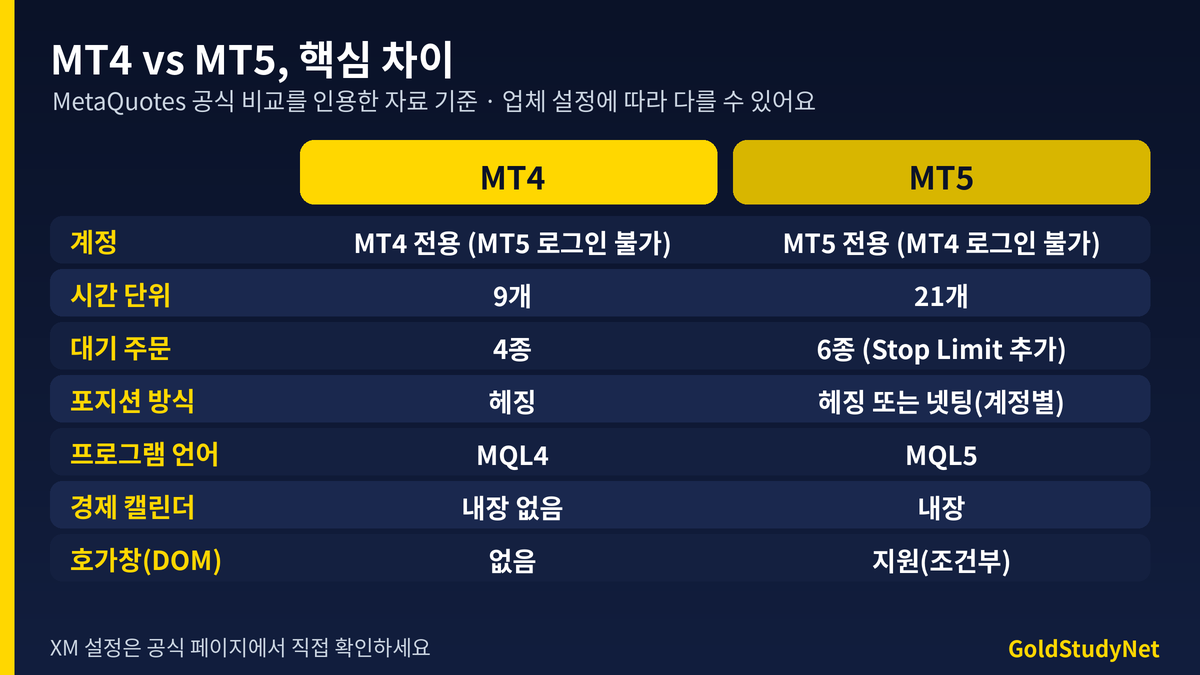
What stands out in the table is not just the difference in numbers. The fact that MT5 came out in 2010 and MT4 came out in 2005 gives the impression that MT5 is a direct successor to MT4, but in reality, Separate platforms with different structuresThis is the key point. So, rather than saying which side is unconditionally superior, the selection criterion is which side has the function I want to use.
03How different are the order types and time units?
MT4 has 9 time units (timeframes): 1 minute, 5 minutes, 15 minutes, 30 minutes, 1 hour, 4 hours, day, week, and month, and MT5 has 21 units with 2 minutes, 3 minutes, 4 minutes, 6 minutes, 10 minutes, 12 minutes, 20 minutes, 2 hours, 3 hours, 6 hours, 8 hours, and 12 hours. MT5 may be advantageous for those who view charts in detail in short increments, or those who need intermediate increments between 4 hours and days. However, if you only use basic units such as day, 4 hours, or 1 hour, the perceived difference may not be significant.
There are 4 types of pending orders for MT4: Buy Limit, Sell Limit, Buy Stop, and Sell Stop, while MT5 has 6 types including Buy Stop Limit and Sell Stop Limit. Stop Limit is a method of placing a limit order when a set stop price is reached. It can be used when you want to confirm a breakout and enter, but avoid a price that is too unfavorable, but it may not be possible to execute. If you are still unfamiliar with the MT5 screen Beginner's Guide to Using MT5When you first open it, look at the blocked areas first, and refer to it along with the rest of the comparisons.
04Hedging and netting have different methods for counting positions.
MT4 allows you to buy and sell the same item at the same time. Hedging method There is only one. MT5 is decided between hedging and netting depending on the account. According to the MQL5 document, in netting there is only one position per stock, while in hedging you can open multiple positions, including in opposite directions, on the same stock. In what way What the company determines for each accountThat's why I can't choose within the platform. Let’s compare numbers.
| situation | hedging account | netting account |
|---|---|---|
| After purchasing 0.1 lots, purchase an additional 0.1 lots | 2 0.1 lot positions | 0.2 lot positions combined into 1 position |
| Then sell 0.1 lot | Sell 0.1 lot position opened separately (buy and sell held simultaneously) | 0.2 lots reduced to 0.1 lots |
| Sell all 0.2 lots | Organize 2 buys + 1 sell separately | 0.2 lots purchased were liquidated |
| holding method | Independent management of multiple | Only one per item |
In a netting account, if you place a sell order while buying, a new position will not be created, but the existing position will be reduced or closed. So, 'I pressed sell, but why doesn't a new position appear and it only decreases?' And it's easy to panic. Conversely, in a hedging account, there may be both buy and sell positions on the same item, so margin and profit and loss must be viewed separately. I could not personally confirm whether XM's MT5 account was netting or hedging, but I only confirmed that there was a clause in the XM Terms and Conditions that mentioned hedging positions. Please check the method of your account directly with the date on the XM official page or account specifications.
05Automatic trading and indicators cannot be used interchangeably.
MT4's automated trading program (EA) and indicators are created in MQL4 and have the extension .ex4. MT5 is MQL5 and .ex5. Although the two languages look similar, they are not compatible with each other, so EA for MT4 cannot be used as is in MT5 and must be recreated or moved. The opposite is also true. If you are using automatic trading, you should first check which program you plan to use runs on before choosing a platform.
I am not in a position to explain automatic trading directly, but I would like to tell you that if you create an account without knowing this when choosing a platform, it may cause inconvenience later. If you trade manually, this item will have little impact, but it is good to know that even if you only use a few indicators, indicator files with the same name may not be compatible with each other.
● When comparing, you may be confused about which is right. It's okay, let's slowly organize the standards together. If you have any questions, please feel free to contact us and we will think about it together. Focus on trading.
06Economic Calendar and Quotation Book
MT5 has an economic calendar built into the platform, so you can check the scheduled indicator announcement schedule right next to the chart. It is said that MT4 does not have a built-in feature, so separate tools or websites are often used. There was an explanation that Depth of Market is a function that can be used in MT5 when provided by stocks and companies, and is not visible in the official function list of MT4. However, unlike stocks, FX does not have a single exchange, so the meaning of the information shown in the quotation window may vary depending on the item and company.
During indicator announcement times, prices move quickly and spreads widen, so it is helpful to have the habit of looking at the schedule in advance. This story Comparison of XM account typesIt is easy to understand if you follow the spread structure shown in . Spreads by account type may vary, so please check the official page.
07So what should I choose?
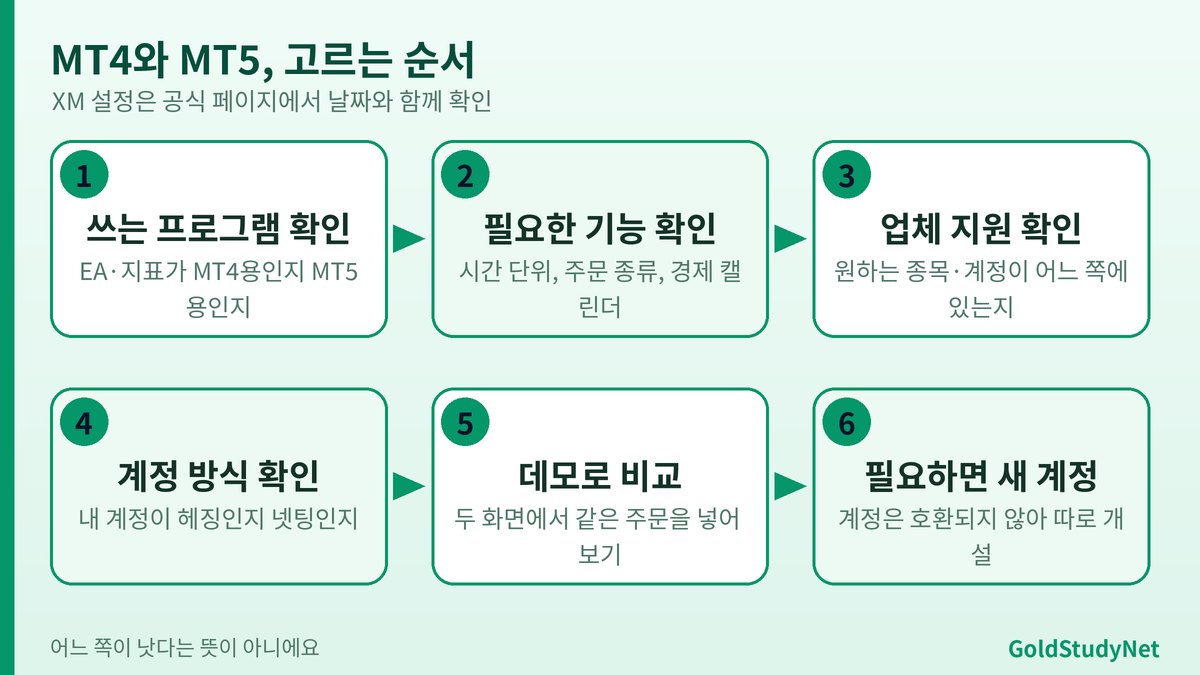
There is no right answer. However, we can summarize the criteria for selection.
☐ If there is an EA or indicator you are already using, check whether it is for MT4 or MT5.
☐ I thought about whether short or medium time units (2 minutes, 2 hours, etc.) are needed.
☐ I was wondering if I needed additional order types like Stop Limit.
☐ I checked whether the stock I was going to use was provided by the company's MT4 or MT5.
☐ I checked whether my account was hedging or netting, along with the date in the company information.
☐ I compared the ordering screens of both platforms using a demo account.
If you are just starting out and trading manually, it is known that you will not experience much inconvenience even if you start with MT5. Conversely, if you are already using a familiar MT4 environment and program, there may be no reason to change. Some sources say that new development of MT4 has been discontinued and new company licensing has been discontinued, but the explanation of the point of discontinuation varies from source to source, so I could not confirm the exact point. However, this does not mean that MT4 will disappear immediately, so please judge based on the scope of support provided by the company.
08Why not open both platforms together?
Since MT4 and MT5 are different programs, you can install both on the same computer and open them separately. If you open both screens side by side with a demo account and place the same order for the same item, you can get a much better feel for where things look different. For example, it is enough to compare the number of types displayed when selecting a pending order rather than a market price in the order window, the length of the time unit button line at the top of the chart, and whether the economic calendar is visible in the toolbox. It is much easier to make a choice when your comparison criteria are clear.
However, please remember that the trading environment and spreads of a demo account may be different from those of a real account. Please use it only to familiarize yourself with the screen and functions, and do not think that the conditions are the same as a real account.
09How to find out which side I am currently using
If you're confused, look to see if the title bar at the top of the platform window says MetaTrader 4 or MetaTrader 5. The server name in the login window or account information email often identifies which platform it is. There are separate mobile apps for MT4 and MT5, so you need to check which one you got in the app store. It is also common for users to be unable to log in because the app they have already downloaded does not match. When first opening an account, the most accurate way to choose a platform is to look at the latest screen on the XM official page.
If you are new to the platform, the steps for opening the MT5 screen for the first time can be found in the MT5 How to Use article mentioned above, and the process of following one order from start to finish is explained in the article below. How to trade FX You can check it in the article.
10Things we haven't confirmed yet
There are parts in this article that I could not confirm. I have not been able to directly check what account types and stocks MT4 and MT5 provide in XM, whether the platform can be changed after opening an account, whether the MT5 account is hedging or netting, and which stocks can be used for quotes. Additionally, the end date of MT4 support and new company licensing policies were different for each source, so it was not possible to determine for sure. Please check this directly with the date on the XM official page. Policies may change over time.
11Frequently Asked Questions
Q. Can I transfer my MT4 account to MT5?
You cannot log in with the same account. The approach is to create a new MT5 account and transfer funds if necessary; check the company's instructions for the exact procedure.
Q. Is MT5 unconditionally better than MT4?
no. It is true that it has more features, but MT4 may be more convenient depending on the program you use or your habits.
Q. Can I use both?
It is known that one company often creates and uses separate MT4 and MT5 accounts. Check the official page to see what happens on XM.
12Organizing
MT4 and MT5 are made by the same company. separate platformTherefore, the accounts are not compatible with each other. The time units were 9 vs. 21, the pending orders were 4 vs. 6, the position method was hedging vs. hedging or netting, the language was MQL4 vs. MQL5, and MT5 had a built-in economic calendar. Rather than deciding which one is better, the selection criteria is based on which function and program I want to use.
Like soccer stories, comparisons become much more comfortable when you place them side by side using the same criteria and distinguish between differences and similarities. Thank you for reading until the end.
● If you have difficulty making a choice, don't worry about it alone. Please feel free to contact us. Let's start with the standards together. Focus on trading.
If this was useful, please leave a rating
I start every morning with the main news and ask “why?” before “how much?”. I only list brokers where I opened an account and traded myself first. If a condition changed or something is wrong, tell me and I’ll fix it.
★ GoldStudy partner link Sign up through this link to get GoldStudy support


